Brain and reflexes
Software
A computer plans the motion, a microcontroller makes it smooth. The same Python code drives the simulated hand and the real one.
How it fits together#
The software is split in two, a bit like a brain and a spinal cord.
The brain
Computer
Python code decides where each joint should go. It also runs the simulation and, later, the AI.
The reflexes
ESP32-S3
Firmware on the microcontroller turns joint angles into smooth motor motion. It knows nothing about grasping, only about moving motors safely.
The muscles
Motors
Each motor winds a tendon that moves one joint. Steppers today, smart servos next.
The two talk over a USB-C cable. The computer always sends joint angles in radians (a way of measuring angles: 1 radian is about 57°). Positive angles close the hand, negative angles open it, and 0 means the joint is straight. The ESP32-S3 works out the motor steps.
Firmware#
The firmware runs on the ESP32-S3 and is built with PlatformIO. It lives in the firmware/ folder.
- Smooth motion. Every move speeds up gently, cruises and slows down gently (a "trapezoidal" speed profile). All 8 motors move at the same time without waiting on each other. A new target in the middle of a move is handled smoothly.
- Safe startup. At power-on every motor pin is switched off, and nothing moves until a command arrives.
- Power saving. A motor's coils switch off after 1 second without motion, to stay within the 5 V / 2 A supply.
- Joint limits. Every target is clamped to the range the real joint can reach.
- Ready for servos. Motor code sits behind one small interface (a hardware abstraction layer, or HAL), so the SCS0009 servos can replace the steppers without changing the rest.
Build and flash it from the firmware/ folder:
pio run                 # build
pio run -t upload       # flash (ESP32 on USB-C)
pio device monitor      # type commands, see replies (Ctrl+C to quit)
The command language#
The computer sends short text commands, one per line. You can type them yourself in the serial monitor. Joints are numbered 1 to 8, in motor order.
| Command | What it does |
|---|---|
P q1 … q8 | Set targets for all 8 joints |
J i q | Set the target of joint i |
S | Report the position of every joint and which ones are moving |
X | Stop all joints, smoothly |
R | Switch off all motors (joints go limp) |
Z | Call the current pose zero |
M i n | Move joint i by n raw steps, ignoring limits (for calibration) |
K i s | Set the steps per radian of joint i (calibration) |
V i v a | Set the top speed and acceleration of joint i |
I | Firmware info |
For example, this bends the index finger's middle joint (joint 2) to 0.8 radians, about 46°:
J 2 0.8The Python library#
The tendra Python package, in software/, is how you control the hand from a computer. It has one interface, Hand, with two versions behind it:
SimHandruns the hand in the MuJoCo simulation.RealHandtalks to the ESP32-S3 over USB and finds it automatically.
Because both share the same commands, a script written for the simulation runs on the real hand by changing one line.
from tendra import RealHand, SimHand

hand = SimHand()                 # MuJoCo simulation
# hand = RealHand()              # real hand; finds the ESP32 on USB automatically

hand.set_joint("index_pip", 0.8)             # radians, positive = closing
hand.set_targets([0.5] * 8)                  # all joints, motor order M1..M8
print(hand.positions())
There is also a software stand-in for the ESP32 (FakeEsp32) that speaks the same command language, so everything can be tested without hardware. The tests also check that the joint names and limits match in the firmware, the Python code and the simulation.
Set up the environment and run the tests from the repository root (you need uv, a Python package manager):
uv sync          # create the Python 3.12 environment (first time only)
uv run pytest    # run the tests
Simulation and digital twin#
The hand's design is exported from Fusion 360 and turned into a model for MuJoCo, a free physics simulator that runs on an ordinary laptop. A script fixes the export along the way: realistic plastic weights, correct joint names and directions, and a motor for every joint.
A digital twin is a virtual copy of the hand that stays in step with the real one. In version 1, you move a slider in the simulation and the command goes to the real hand. The terminal shows how far the real hand and the simulation are apart.
uv run python sim/view.py               # open the hand in the MuJoCo viewer
uv run python sim/twin.py --fake        # digital twin with a software ESP32
uv run python sim/twin.py --port auto   # digital twin driving the real hand
For now, information flows one way: from the simulation to the real hand. Once the smart servos can report their positions, the simulation will also follow what the real hand is actually doing.
Webcam control#
Hold your hand up to an ordinary webcam and the simulated hand copies it, finger by finger. An AI model from Google's MediaPipe finds 21 points on your hand in every camera image. The software then works out the angle of each of your joints and turns them into joint angles for the robot. This step is called retargeting, because a robot hand is not built exactly like yours. It runs on an ordinary laptop, at about 20 camera images per second.
uv run python sim/teleop.py              # your hand moves the five-finger simulated hand
uv run python sim/teleop.py --hand v0    # the thumb and index prototype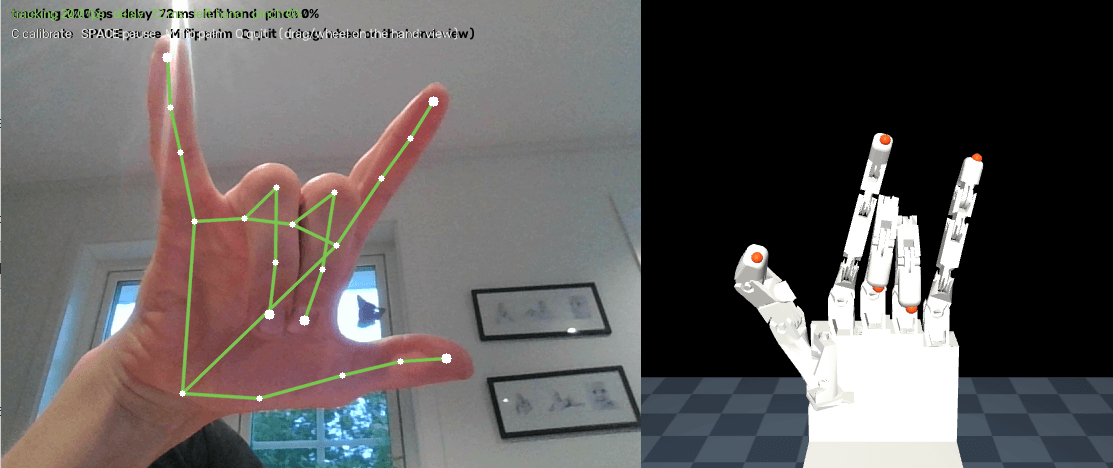
So far this drives the simulation. The same commands can go to the real hand once it has been powered on and calibrated.
AI control (next steps)#
The software is being shaped for AI from the start. The plan, step by step:
- Teleoperation. Move your own hand in front of a webcam and the robot hand copies it. This already works in the simulation (see above). Next, it will drive the real hand and record examples.
- Learning from examples. Train a neural network on those recordings.
- Learning by practice. Train in the simulation, with lots of variation, then transfer what it learned to the real hand. This needs a strong graphics card, so it will run on rented cloud GPUs. NVIDIA Isaac Sim or Isaac Lab may be added for larger-scale training.
- Seeing and grasping. Use a camera to find objects and decide how to pick them up.
Because the AI will talk to the same Hand interface, it can be trained in simulation and then run on the real hand without changes to its code.